
AI Ad Creative for B2B: How to Produce 10x More Variants Without a Design Team
Performance Max wants 15 headline variations, 5 description combinations and a dozen image assets before it even starts optimizing. Advantage+ burns through creative faster than your team can produce it. LinkedIn Accelerate generates its own ads — but they look generic and miss your positioning entirely.
The bottleneck in B2B paid advertising is no longer budget, bidding or targeting. It is creative production. And most B2B teams are losing this race.
The math is brutal. Google recommends refreshing ad creative every two to four weeks to avoid fatigue. If you run campaigns across three platforms with four audience segments, you need 50 to 100 unique creative variants per month just to keep pace. A single designer producing two to three assets per day cannot sustain that volume — and hiring a second designer doubles your cost without doubling your output.
AI ad creative tools change this equation. They do not replace your designer. They replace the repetitive production work — the resizing, the variant generation, the copy permutations — so your team can focus on strategy, messaging and brand quality.
We have spent three months testing AI creative workflows on real B2B campaigns. Here is what actually works, what produces junk, and how to build a system that scales without sacrificing quality.
Why B2B Creative Is Harder Than B2C
Before diving into tactics, it is worth understanding why most AI ad creative tools underperform for B2B. The platforms were trained primarily on B2C data — e-commerce product shots, lifestyle imagery, short punchy copy designed to trigger impulse purchases.
B2B advertising operates differently. Your audience is smaller and more skeptical. A procurement director evaluating enterprise software does not respond to the same visual language as a consumer scrolling Instagram for shoes.
Three characteristics make B2B creative uniquely difficult for AI tools.
Messaging precision matters more than visual impact. A B2C ad can succeed with a striking image and three words. A B2B ad needs to communicate a specific value proposition to a specific buyer persona — and getting the nuance wrong means the click is worthless because the lead will never convert.
Longer copy performs better than short copy. B2B buyers want substance. LinkedIn Sponsored Content with 150 words of primary text consistently outperforms 30-word versions in our testing. AI tools that default to punchy one-liners miss the mark for B2B.
Brand consistency is non-negotiable. B2B brands sell trust. An ad that looks different from your website, your sales deck and your email sequences breaks the continuity that enterprise buyers expect. AI-generated creative that drifts from your brand guidelines does more harm than good.
These constraints do not make AI creative tools useless for B2B. They make tool selection and workflow design critical. The wrong tool produces beautiful ads that generate zero pipeline. The right tool produces on-brand variants at a speed your competitors cannot match.
The Creative Volume Problem — By the Numbers
Here is what the ad platforms actually demand from B2B teams in 2026.
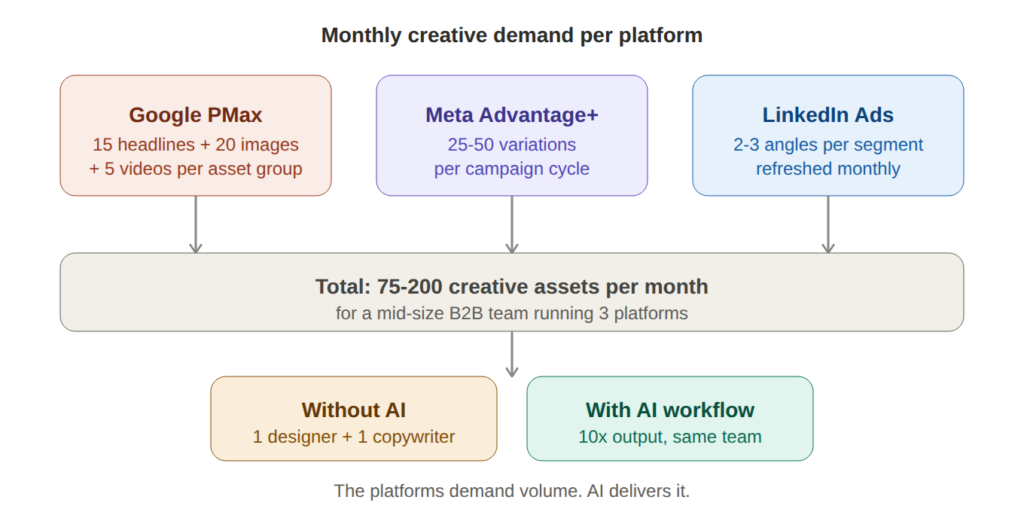
Google Performance Max accepts up to 15 headlines, 5 long headlines, 5 descriptions, 20 images, 5 logos and 5 videos per asset group. Google explicitly recommends maxing out every slot — campaigns with full asset groups consistently outperform those with partial fills. Multiply by the number of audience segments you target, and a single PMax campaign can require 100+ creative assets.
Meta Advantage+ performs best when it can test 5 to 10 ad variations per ad set. With three to five ad sets per campaign, you need 25 to 50 variations per campaign cycle. Meta’s algorithm burns through creative in days, not weeks — a static set of four ads will fatigue within two weeks.
LinkedIn campaigns need fewer variations but higher quality. Two to three messaging angles per audience segment, refreshed monthly. The volume is lower but the production effort per asset is higher because of longer copy requirements and stricter brand expectations.
Add it up across platforms and a mid-size B2B team running active campaigns on all three needs 75 to 200 creative assets per month. Without AI, that requires a full-time designer and a full-time copywriter dedicated exclusively to paid advertising. Most B2B teams do not have that luxury.
A Five-Step AI Creative Workflow That Actually Works for B2B
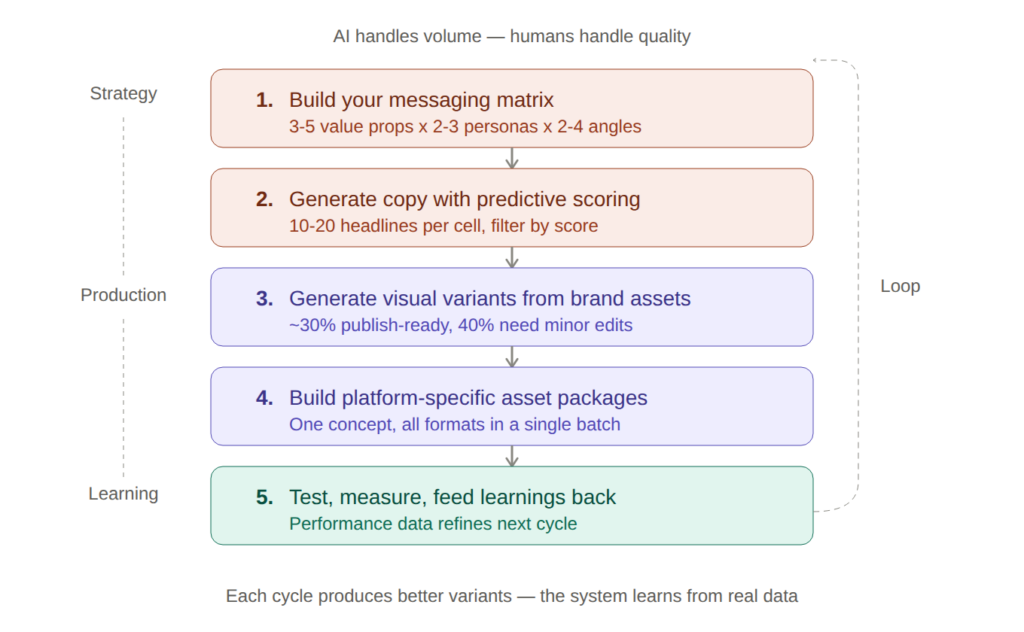
This is the workflow we use to produce 10x more creative variants without adding headcount. Each step uses a specific type of AI tool for a specific job. The key principle: AI handles volume, humans handle quality.
Step 1: Build your messaging matrix before you touch any tool
The biggest mistake B2B teams make with AI creative tools is jumping straight into generation without a messaging framework. The AI produces volume — but volume of what?
Before generating a single ad, define your messaging matrix. Map out three to five core value propositions, two to three buyer personas, and two to four messaging angles per combination. Angles include pain-led (the problem you solve), outcome-led (the result you deliver), proof-led (the evidence you have) and competitor-led (why you beat the alternative).
This matrix becomes your prompt library. Instead of asking AI to “write a Google Ads headline for our product,” you prompt it with “write a pain-led headline targeting IT directors frustrated by manual compliance reporting.” The specificity transforms output quality.
Step 2: Generate copy variations with predictive scoring
Use an AI copy tool to produce 10 to 20 headline variations and 5 to 10 description variations per cell in your messaging matrix. The goal is not perfection — it is volume with directional quality signals.
Tools with predictive performance scoring let you filter before testing. Instead of running 50 ad copy variants through your budget, you narrow to the 15 with the highest predicted conversion probability and test only those. This compresses the testing cycle and reduces wasted spend.
Feed the tool your brand voice guidelines, past winning ad copy and specific persona details. The more context you provide, the fewer generic outputs you get. A prompt that includes “our audience is VP-level buyers at companies with 500+ employees evaluating data integration platforms” produces dramatically better copy than “write B2B ad copy.”
Step 3: Generate visual variants from existing brand assets
This is where most B2B teams break down. You have the copy — now you need images, banners and potentially video to match.
AI creative generation tools produce visual ad variants from your existing brand assets — logos, product screenshots, brand colors, photography. Upload your brand kit once, and the tool generates dozens of platform-specific variations sized correctly for Google Display, Meta feeds, LinkedIn Sponsored Content and Stories.
The critical filter for B2B: score or rank the generated creatives before publishing. Tools with performance prediction analyze which visual elements, layouts and color combinations historically drive higher click-through and conversion rates. Use that data to shortlist, not to blindly publish.
Expect roughly 30 percent of AI-generated visuals to be immediately usable. Another 40 percent will need minor edits — cropping, text adjustments, color corrections. The remaining 30 percent will miss the mark entirely. This is normal. The time saved still represents a 5x improvement over manual production.
Step 4: Build platform-specific asset packages
Each ad platform has different format requirements. A single creative concept needs to exist as a 1200×628 landscape for Google Display, a 1080×1080 square for Meta feeds, a 1200×1200 for LinkedIn, a 1080×1920 for Stories, and potentially a 15-second video for YouTube and TikTok.
Manual resizing and reformatting is the most tedious part of ad production — and the most automatable. AI tools handle the mechanical reformatting while preserving layout integrity. Your designer reviews the output rather than producing it from scratch.
Build a template system: for each approved creative concept, generate all platform formats in a single batch. This turns a half-day manual process into a 30-minute review session.
Step 5: Test, measure and feed learnings back into the system
The AI creative workflow is a loop, not a line. After running ads for one to two weeks, pull performance data and feed it back into your process.
Which messaging angles are winning? Update your messaging matrix to weight those angles more heavily. Which visual styles are driving clicks? Train your AI tools on those patterns. Which personas are responding to which copy? Refine your prompts accordingly.
The teams that treat AI creative generation as a one-time production hack see diminishing returns within months. The teams that build feedback loops see compounding improvement — each cycle produces better variants because the system learns from real performance data.
For a detailed comparison of the AI tools that handle each step — from copy generation to visual creation to performance prediction — see our guide to the best AI tools for paid advertising.
Five AI Creative Mistakes That Kill B2B Ad Performance
Producing more creative is only valuable if the creative is good. These are the patterns we see B2B teams repeat — and the fixes that work.
Publishing AI output without human review. Every AI creative tool produces a percentage of unusable output. Some headlines make grammatical sense but communicate the wrong value proposition. Some visuals look professional but use imagery that contradicts your brand positioning. Build an editorial review step into your workflow — no AI-generated ad goes live without a human checking messaging accuracy, brand alignment and platform compliance.
Using generic prompts and wondering why output is generic. “Write Google Ads headlines for a SaaS company” produces garbage. “Write three pain-led headlines targeting CFOs at mid-market manufacturing companies frustrated by manual financial close processes, tone is direct and confident, max 30 characters” produces something useful. The quality of your AI output is directly proportional to the specificity of your input.
Generating creative without a messaging framework. If you do not know which value propositions to test, generating 100 variants just gives you 100 random ads. The messaging matrix from Step 1 is not optional — it is the foundation that makes AI volume valuable instead of noisy.
Ignoring platform-specific creative best practices. An ad that works on LinkedIn will not work on Meta. LinkedIn rewards longer, text-heavy creative. Meta rewards visual impact and short copy. Google Display needs clear CTAs at small sizes. AI tools generate variants — but you need to brief them differently per platform, not just resize the same concept.
Treating AI creative as a cost-cutting exercise. The goal is not to fire your designer. The goal is to free your designer from production work so they can focus on brand strategy, campaign concepts and creative direction. Teams that use AI to eliminate design roles end up with a library of technically competent but strategically empty ads. Teams that use AI to amplify their designer produce more creative, better creative, and faster creative.
A Realistic Timeline for Your First AI Creative Sprint
You do not need to overhaul your entire creative process to start. Here is a two-week sprint that produces measurable results.
Week 1 — Setup and first batch. Day 1: Build your messaging matrix (3 value props x 2 personas x 3 angles = 18 cells). Day 2: Choose your AI copy tool and generate 10 headline variations per cell. Filter to the top 3 per cell using predictive scores or editorial judgment. Day 3: Upload your brand assets to your AI creative tool. Generate visual variants for your top-performing messaging cells. Day 4-5: Review, edit and package assets by platform format. Launch your first AI-assisted campaign batch.
Week 2 — Measure and iterate. Day 8: Pull initial performance data. Identify which messaging angles and visual styles are outperforming. Day 9-10: Generate a second batch focused on your winning angles — more variations of what works, fewer of what does not. Day 11-12: Launch the refined batch and compare performance against your baseline. Document what you learned for the next cycle.
After two weeks you will have produced more creative variants than your team typically produces in a month. More importantly, you will have a repeatable system — a messaging matrix, a prompt library, a review workflow and a feedback loop — that compounds with every cycle.
The B2B teams that figure out AI-assisted creative production in 2026 will not just save time. They will out-test, out-learn and out-convert their competitors on every platform. The ones that keep producing three static ads per campaign will watch their cost per lead climb every quarter while wondering what changed.
The platforms changed. Your creative process needs to change with them.
You can read our AdCreative.ai Review to know more about improving creative process.